Reference sheets, xan, nala, and duf
29 Apr 2025QuickRef.ME
A collection of cheatsheets for various computing tools and languages. I’ve used the ones for RegEX and Sed and they’re good! I think the Linux Command section is the most interesting. There is also a list of keyboard shortcuts for various apps and websites. Oh and everything is community contributed! Similar to devdocs.io from the last post, this is basically a bunch of documentation in a unified format.
Link: https://quickref.me
xan
A command line tool for inspecting and processing csv files which is YARR (Yet Another Rust Rewrite). The neat part here (for me) is that it lets you plot the contents directly in the terminal.
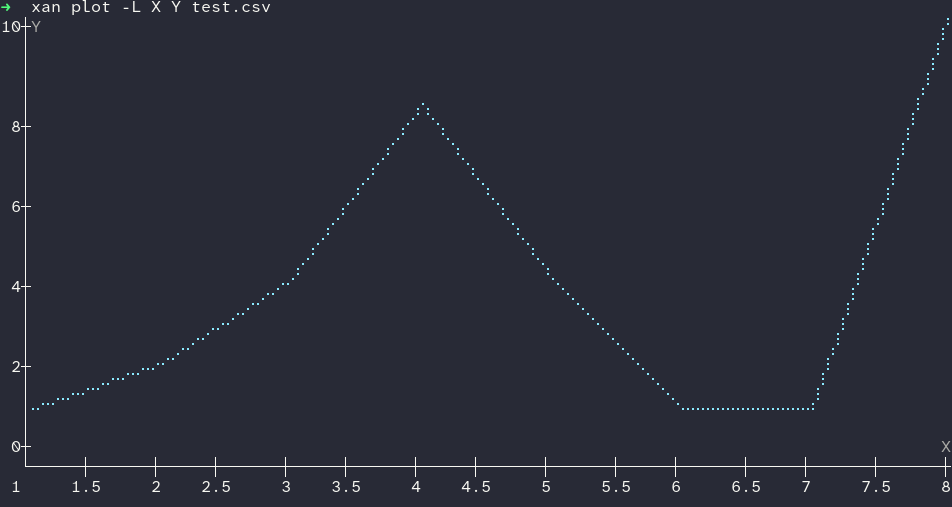
Given a csv:
X,Y
1,1
2,2
3,4
4,8
5,4
6,1
7,1
8,10
xan plot --line X Y test.csv will yield the following plot in the terminal emulator. It also handles timestamps well for the x values.
One mark against xan is that it didn’t install flawlessly on my system. cargo install xan resulted in an error about some badly written dependency code, but installing from the git repo worked with CARGO_BUILD_RUSTFLAGS='-C target-cpu=native' cargo install --git https://github.com/medialab/xan.
Repo: https://github.com/medialab/xan
nala
This is an improved apt experience for those on Debian based systems. I’ve just started using it and so far so good. Highlights for me are: colorized and nicely formatted output, parallel downloads. The speed up is nice and it seems like a drop-in replacement for apt in terms of my typical use (apt update/nala update, apt install xan/nala install xan, …).
Repo: https://github.com/volitank/nala
duf
This is an improved disk usage utility meant to replace df. I started using it at the same time as nala and have had a similarly “harmless upgrade” experience. There isn’t much to write about - the default df output isn’t the easiest to interpret while the duf default output is well organized and colorized.